The Tigerman Saga
VR Chat Navigation Info
Some basic info concerning use of the
Blaxxun chat interface.
Much information in VR can be seen simply by "right clicking" the 3D scene
and browsing the box that pops up.
Such as speed of avatar, walking, flying, viewpoints, etc.
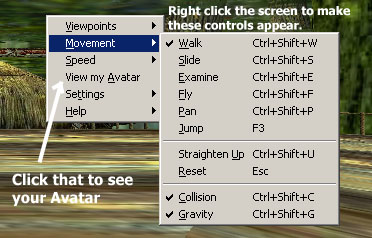
Start off by clicking "View My Avatar".
That will give you a 3rd person perspective of yourself there.
You will be a bluebee at first (blue newby).
Below, you can learn how to add new avatars.
From that same box, you can change speeds,
change viewpoints (move automatically to other spots), and a few other things.
To learn more about the functions in the chat client box,
check out the screenshots and captions below.
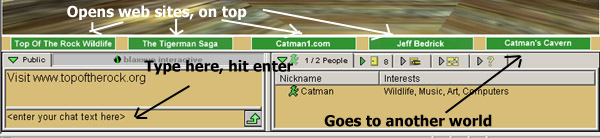
Type in the chat blank, press enter. You will hear a voice speak what you type :)
The green buttons open websites "on top" of the chat, or go to another world.
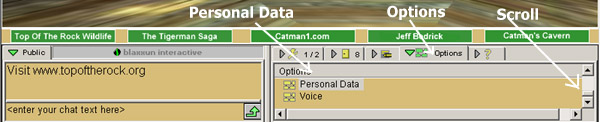
To Add and change Avatars
1. Click the Options tab
2, Scroll down to Personal Data
3. Click Personal Data link to open a Data box.
(see below)
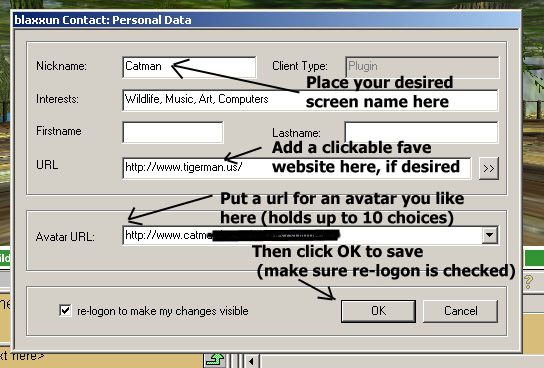
Here you can add/change your screen name, add a favorite website link
and place the URL of your chosen avatar. Click OK to save.
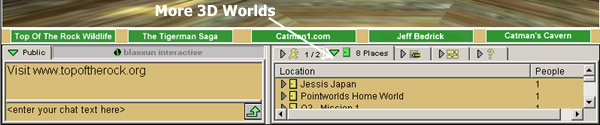
To find other 3D worlds.
Click the second tab from the left (Places).
Worlds that have people in them will show up as doors,
and shows the number of people there.
Click a door to go to the desired world.
Go Back To The Tigerman Rainforest Page
Enter 3D The Rain Forest Chat World
Tigerman Saga and the 3D VR chat worlds are provided in support of:
Top Of The Rock Wildlife Humane Society & Wildlife Sanctuary
Top Of The Rock Wildlife Humane Society is a 501-(c)-3 tax-exempt nonprofit organization
dedicated to reducing animal suffering through action, education and wildlife sanctuary.
Visit Top Of The Rock Wildlife Humane Society
Learn More About Catman's 3d Virtual Reality Chats
Find more 3D worlds, Avatars, and general info there.
The Tigerman Saga
The Tigerman Saga Show DVDs
View the Tigerman Saga on DVDs.
The Tigerman Saga Show is narrated by the author,
has awesome background music, and cool special effects sounds.
Proceeds go to Top Of The Rock Wildlife Humane Society